| |
| CANADIAN PROFESSIONAL RODEO ASSOCIATION - 2018 EVENT CALENDAR |
| |
To download the Google Calendar for your Phone:
Step 1) Go to the Page that displays the Calendar (http://rodeocanada.com/cpra-calendar.htm) |
| |
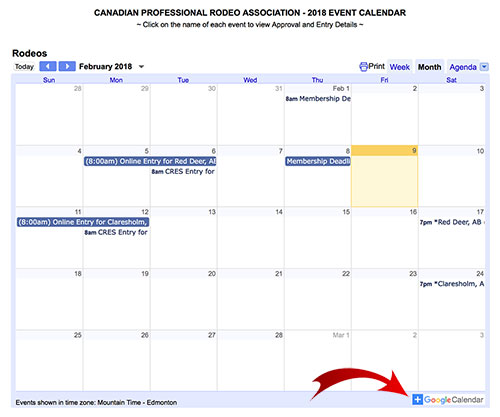
| Step 2) Bottom Right hand corner of the screen on the Calendar Page has “+Google Calendar” |
| |
| Looks like this: |
| |
 |
| |
Step 3) It will prompt you to your personal a google calendar.
It will ask if you want to add the “CPRA Rodeo Calendar” – and select “Add” |
| |
| Step 4) From there you may have to enter a password to your email or if you are already logged into your email on your phone it will do it automatically. |
| |
Now... for easy access to look at the events, you can download the Google Calendar on your smart phone for Android or iPhone and it is more user friendly.
 |
| |
Androrid: https://play.google.com/store/apps/details?id=com.google.android.calendar&hl=en |
| |
iPhone: https://itunes.apple.com/us/app/google-calendar/id909319292?mt=8 |
| |
| If you have any problems accessing the calendar or have any questions regarding the app, please contact: payout@rodeocanada.com |
| |


